


Core Web Vitals are how Google scores the experience of using your website. Slow page, jumpy layout, button that does nothing for a second after a tap. That is what the metrics measure. They affect rankings, which gets the SEO attention. They affect whether someone calls your business, which is what actually matters, and gets less of it.
This guide explains the three metrics, the specific numbers to hit, and the fixes that move the score for service business websites. No surface-level jargon. The fixes link to where we handle them on a real site, in case you want help.
If you want to know your site's Core Web Vitals scores and what they would take to fix, our team can pull the numbers and route the work. See our technical SEO service, or start a conversation.
What Are Core Web Vitals?
Core Web Vitals are three measurements Google uses to evaluate how fast and stable your website feels. They affect rankings and conversion rates. You do not need to be technical to understand them.
As of March 2024, INP replaced FID as the responsiveness metric. If you are still reading about FID, that information is outdated.
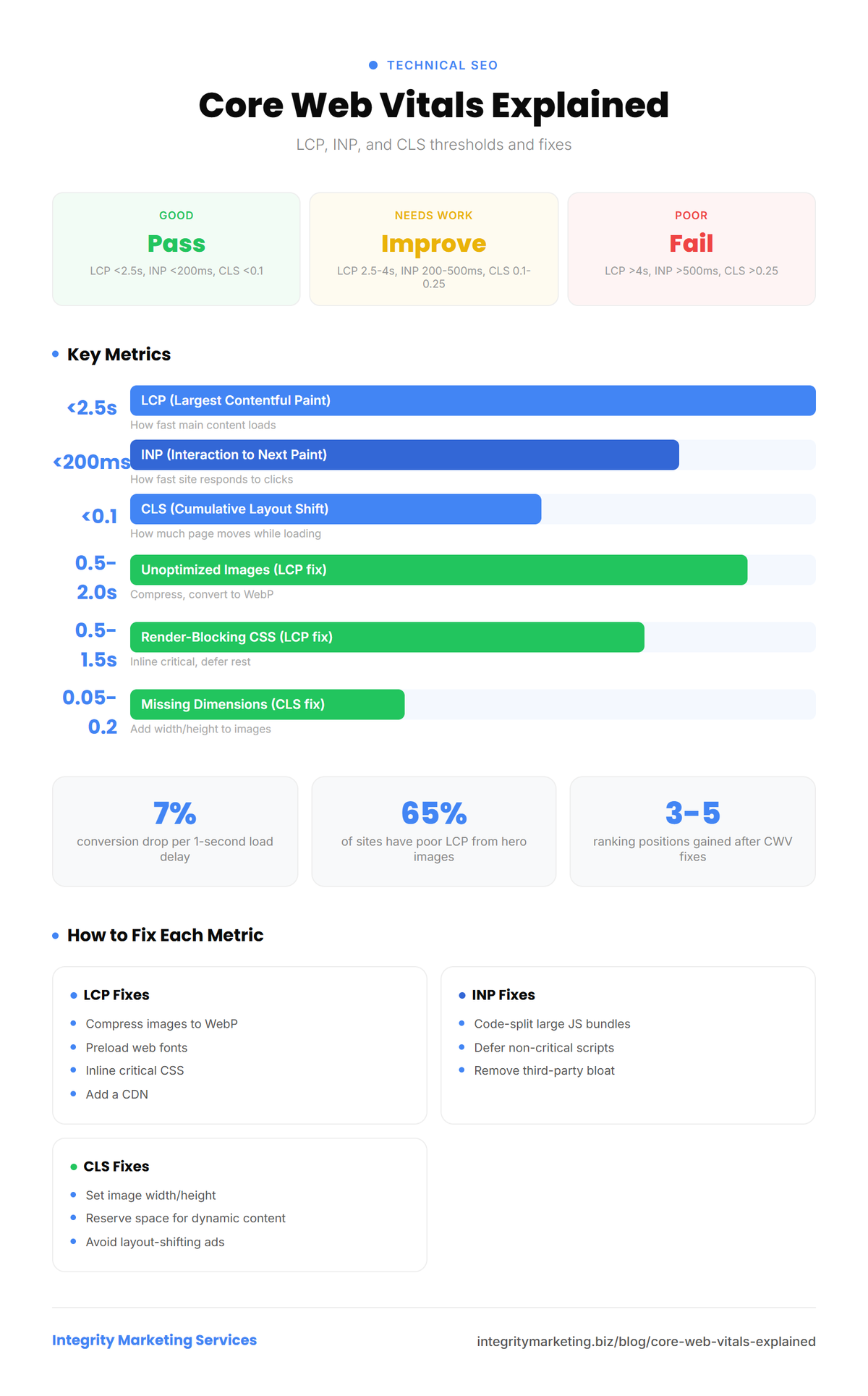
The Three Metrics (In Plain English)
LCP
Largest Contentful Paint
How fast the main content loads. Think: how quickly does your storefront sign light up?
Why it matters: Visitors leave slow sites. Google ranks faster sites higher.
INP
Interaction to Next Paint
How fast the site responds to clicks and taps. Think: how quickly does the door open when pushed?
Why it matters: Sluggish sites frustrate users and hurt conversions.
CLS
Cumulative Layout Shift
How much the page moves while loading. Think: does the furniture move while customers walk through?
Why it matters: Layout shifts make users click the wrong thing.
Real-World Examples of Each Metric
Understanding the thresholds is one thing. Seeing how they play out on real websites is more useful.
LCP in practice
A local plumbing company had a 6.2-second LCP on mobile. The culprit was a 4MB hero image that was not compressed or served in a modern format. After converting to WebP, adding proper sizing, and implementing lazy loading for below-the-fold images, their LCP dropped to 1.8 seconds. The result: a 23% increase in form submissions over the following 6 weeks with no other changes to the page.
The most common LCP element is the hero image or the largest text block visible when the page first loads. If your hero image is an uncompressed PNG or a full-resolution JPEG, that is almost certainly your LCP bottleneck. Server response time also plays a role. A slow host adds delay before any content can even start rendering.
INP in practice
An e-commerce site had an INP of 480ms. Users would click "Add to Cart" and see nothing happen for nearly half a second. The problem was a bloated JavaScript bundle that blocked the main thread during interactions. After code splitting and deferring non-critical scripts, INP dropped to 140ms. Cart additions increased by 15%.
INP measures the worst interaction delay during a user's entire session, not just the first click. This means a page can load fast but still fail INP if clicking a button, opening a menu, or filling out a form causes a long delay. Heavy analytics scripts, chat widgets, and third-party embeds are frequent offenders.
CLS in practice
A dental practice website had a CLS score of 0.38. Every time the page loaded, a late-loading Google Maps embed and an ad banner would push the content down, causing the phone number to jump below the fold. Patients trying to tap the phone number would accidentally tap a different link. After adding explicit dimensions to the map embed and reserving space for the banner, CLS dropped to 0.04. Bounce rate decreased by 11%.
CLS is the metric users feel most viscerally. When content shifts while you are reading or clicking, it breaks trust. The most common causes are images without width and height attributes, fonts that swap in late and change text size, and dynamic content that loads after the initial render.
Why Core Web Vitals Matter for Your Business
CWV is a ranking factor since 2021 and a conversion factor always. A 1-second delay in page load reduces conversions by 7%. For a business generating 100 leads per month, a 1-second improvement could mean 7 additional leads without any other changes.
Beyond conversions, Core Web Vitals directly affect how Google evaluates your site as part of its page experience signals. Sites that pass all three CWV thresholds get a small but consistent ranking boost. In competitive local markets where multiple businesses have similar content and authority, that boost can be the difference between position 3 and position 7. Our technical SEO service starts with a full CWV audit because fixing these metrics is one of the fastest ways to improve both rankings and conversion rates.
"The most common CWV issue we find is poor LCP from unoptimized hero images. We see it on about 65% of sites. After fixing it, the average ranking improvement is 3-5 positions within 4 to 6 weeks."
Dylan Axelson, SEO Director
How to Measure Core Web Vitals
There are two types of CWV data: lab data and field data. Lab data comes from simulated tests. Field data comes from real users visiting your site. Google uses field data for ranking decisions, so that is what matters most. Here are the tools to use.
Google PageSpeed Insights
The starting point for any CWV check. Enter your URL and get both lab and field data. The field data section at the top (labeled "Discover what your real users are experiencing") is the data Google uses. The lab data below gives you specific diagnostic recommendations. Always test on mobile first. That is the index Google prioritizes.
Google Search Console
The Core Web Vitals report in Search Console shows site-wide performance grouped by status: good, needs improvement, or poor. It groups URLs by similar structure so you can identify patterns. If all your blog posts have poor LCP, the fix is likely a template-level issue rather than a per-page problem.
Chrome DevTools
For developers who want granular data, Chrome DevTools Performance panel shows exactly when each metric fires during page load. This is the tool to use when you know there is a problem but cannot identify the specific cause. The Lighthouse tab runs a lab audit directly in the browser.
Web Vitals Chrome Extension
A lightweight extension that shows real-time CWV scores as you browse your own site. Useful for quick spot-checks during development and after deploying fixes. It measures each metric as you interact with the page, so you can test INP by clicking buttons and navigating.
For a thorough assessment, our SEO audit guide explains how CWV fits into a broader site health evaluation.
Check Your Scores
- Go to pagespeed.web.dev. Enter your URL.
- Check both mobile and desktop. Mobile matters more.
- Review scores: Green = Good. Yellow = Needs Improvement. Red = Poor.
- Check the Diagnostics section for specific recommendations.
- For real-user data, use Google Search Console > Core Web Vitals report.
- Run competitor URLs for comparison.
Common Issues and How to Fix Them
Loading speed fixes
Unoptimized images
Compress, convert to WebP, add lazy loading
No font preloading
Add preload links for web fonts
Render-blocking CSS
Inline critical CSS, defer the rest
No CDN
Add Cloudflare or similar CDN
Responsiveness fixes
Large JS bundles
Code split, defer non-critical scripts
Third-party scripts
Defer, async, or remove (also affects LCP)
Stability fixes
Missing image dimensions
Add width and height attributes to all images
Dynamic content loading
Set explicit dimensions for dynamic elements
"The fix that delivers the biggest CWV improvement for the least effort is image optimization. Converting to WebP and adding lazy loading takes about an hour and usually improves LCP by 1 to 2 seconds. It is the first thing I do on every project."
David Chung, Web Designer/Developer
How Core Web Vitals Affect SEO Rankings
CWV is a tiebreaker, not the primary ranking factor. Content and backlinks carry more weight. But in competitive markets, the faster page wins when content quality is similar. Do not obsess over perfect scores at the expense of content quality. Do fix anything in the red zone.
What Good Scores Look Like
Most local business sites score "needs improvement." Getting to "good" puts you ahead of 60-70% of competitors. That is a meaningful advantage. Perfect scores are not necessary.
Targets: LCP under 2.5s, INP under 200ms, CLS under 0.1. All achievable with the fixes above.
For a complete technical audit, see our technical SEO checklist or request a free audit.
Free Tools and Resources
These free tools can help you measure and improve your Core Web Vitals. We are not affiliated with any of them.
- Google PageSpeed Insights — Test any URL and get Core Web Vitals scores with specific fix recommendations.
- Chrome User Experience Report — See real-world Core Web Vitals data from Chrome users visiting your site.
- WebPageTest — Advanced performance testing with waterfall charts showing exactly what slows your page down.
Frequently Asked Questions
What are Core Web Vitals and why do they matter?
Three Google metrics measuring speed (LCP), responsiveness (INP), and stability (CLS). They affect rankings and conversions.
How do I check my Core Web Vitals score?
Go to pagespeed.web.dev and enter your URL. For real-user data, use Google Search Console's Core Web Vitals report. Both are free.
What is a good LCP score?
Under 2.5 seconds. Between 2.5 and 4.0 needs improvement. Over 4.0 is poor.
Do Core Web Vitals affect Google rankings?
Yes. They act as a tiebreaker between pages with similar content and authority. Poor scores actively hurt rankings.
How long does it take to fix Core Web Vitals?
Easy fixes take hours. Medium fixes take days. After fixing, Google re-evaluates over 2 to 4 weeks using real-user data.
Speed and stability are the cheapest conversion lift on most service business sites. If you want us to pull your scores and price out the fixes, our technical SEO service covers it. Or read how we build sites that pass Core Web Vitals from day one on our web design service.
Short contracts, full ownership, no obligation.
Grow organically
Want to improve your organic rankings?
We build SEO strategies that generate qualified leads month after month. Real results backed by real data from 100+ client campaigns.